
Online UPS vs Offline UPS Price in India: Difference, Working Principle & Which Is Better
19 October 2026
How Much Do Online UPS and Offline UPS Cost in India?
For a 1kVA unit, an offline UPS costs about ₹4,500–₹9,000, a line-interactive UPS about ₹8,000–₹16,500, and an online UPS about ₹16,000–₹22,000 before external batteries. These three are very different products sold under the same “1kVA UPS” label. Larger online UPS systems cost more: single-phase online UPS runs roughly ₹28,000–₹35,000 for 2kVA, ₹32,000–₹43,000 for 3kVA, ₹62,000–₹78,000 for 5–5.5kVA, and ₹89,000–₹1,15,000 for 10kVA, before any external battery bank. Online UPS costs more because it handles the full load continuously, which needs stronger components and better cooling.
Prices vary by brand, battery type, and whether batteries are built in. Treat them as guides and get a written quote before you buy.
Table of Contents
- Online UPS vs Offline UPS Price at a Glance
- What Is a UPS System?
- What Is Online UPS?
- Online UPS Working Principle
- What Is Offline UPS?
- Offline UPS Working Principle
- Online UPS and Offline UPS Difference: Comparison Table
- Types of UPS Systems
- Online UPS Price by Capacity
- Why Is Online UPS More Expensive?
- Online UPS vs Offline UPS: Which Is Better?
- How to Choose the Right UPS
- UPS vs Inverter: What Is the Difference?
- FAQs
- Conclusion
Online UPS vs Offline UPS Price at a Glance
This UPS comparison shows the 1kVA price, transfer time, and best use for each of the three main UPS types.
| Feature | Offline UPS | Line-interactive UPS | Online UPS |
|---|---|---|---|
| 1kVA price | ₹4,500 – ₹9,000 | ₹8,000 – ₹16,500 | ₹16,000 – ₹22,000 (before batteries) |
| Transfer time | About 4–10 ms | About 2–6 ms | Zero |
| Output quality | Mains pass-through, battery on failure | Mains with voltage correction | Always regenerated, fully clean |
| Efficiency | Highest | High | About 88–90% |
| Best for | Desktop PC, router, TV | Home office, small shops | Servers, CCTV, labs, medical |
The transfer time for line-interactive is a general industry range. Check your model’s datasheet for exact figures.
What Is a UPS System?
A UPS (Uninterruptible Power Supply) is a device that keeps connected equipment running during a power cut by drawing energy from a battery. It charges the battery from the mains and converts battery DC power into AC using an inverter.
During normal operation, power comes from the AC mains. When mains power fails, the UPS switches to its battery and inverter. How that switch happens, and how much of the system stays active in normal operation, is the core UPS difference between online and offline designs. This is the basis of modern UPS technology and UPS types.
What Is Online UPS?
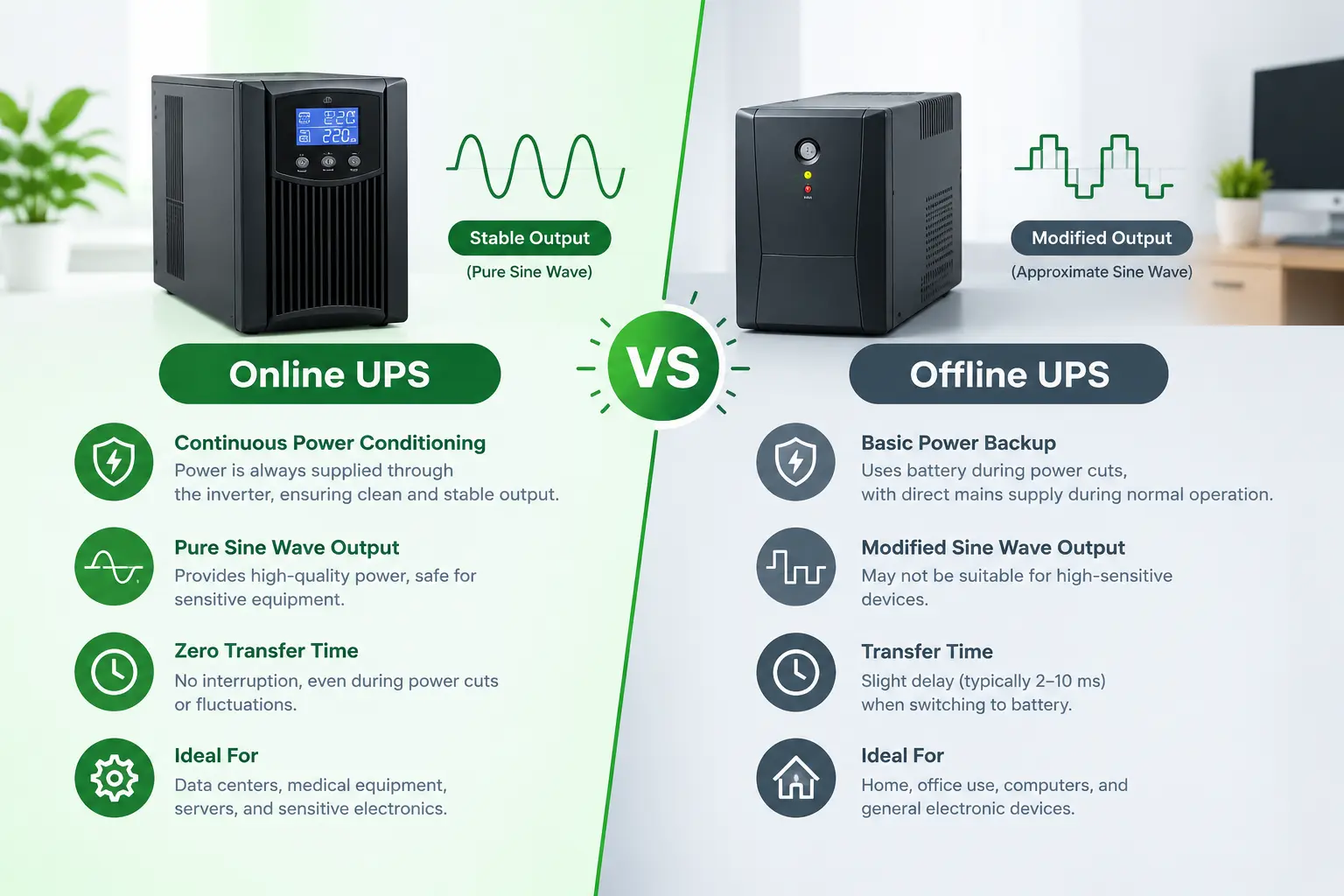
An online UPS is a UPS that always powers the load through its rectifier and inverter, so the output never depends directly on the mains and there is no switching delay.
Because the inverter is always running, the output is regenerated and isolated from mains distortion, spikes, and sags. This makes the online UPS the choice for equipment that cannot tolerate even a tiny gap in power. It is also called a double-conversion UPS because power is converted twice: AC to DC, then DC back to AC.
Online UPS Working Principle
In online UPS working, mains AC is converted to DC by a rectifier, which charges the battery and feeds the inverter. The inverter produces clean AC for the load at all times. If mains fails, the battery takes over feeding the inverter, with zero transfer time.
Step by step:
- Mains AC enters the rectifier and becomes DC.
- The DC charges the battery through a charge controller.
- The same DC feeds the inverter.
- The inverter produces regulated AC for the load.
- During a power cut, the battery supplies the inverter directly, and the load sees no interruption.
Because the full load current flows through the whole circuit all the time, the system runs warmer. It needs larger heat sinks and components rated for continuous high temperature, which raises the cost.
What Is Offline UPS?
An offline UPS, also called a standby UPS, passes mains power directly to the load in normal operation and switches to its battery and inverter only when the mains fails.
Since the inverter stays idle until needed, the unit runs cool and uses less energy. The trade-off is a brief switching delay and less protection from mains distortion. An offline UPS suits equipment that can tolerate a few milliseconds of gap, such as desktop computers and routers.
Offline UPS Working Principle
In offline UPS working, mains power goes straight to the load through a static transfer switch while a small charger keeps the battery full. When mains fails, the switch moves the load to the inverter within a few milliseconds.
Step by step:
- Mains AC reaches the load directly through a transfer switch.
- A small rectifier and charger keep the battery charged.
- The inverter stays off.
- On a power cut, the switch detects the failure and transfers the load to the inverter.
- The inverter converts battery DC into AC for the load.
The switching time is typically a few milliseconds, which is fast enough for most computers but not for sensitive medical or industrial equipment. Because the load is connected directly to the mains in normal operation, voltage spikes and distortion can pass through.
Online UPS and Offline UPS Difference: Comparison Table
The main online UPS and offline UPS difference is that online UPS powers the load through the inverter all the time, while offline UPS powers it from the mains and uses the inverter only during a power cut.
| Feature | Online UPS | Offline UPS |
|---|---|---|
| Power path in normal mode | Rectifier and inverter | Mains directly to load |
| Inverter state | Always on | Off until power failure |
| Transfer time | Zero | A few milliseconds |
| Isolation from mains | Complete | None |
| Protection from spikes and distortion | High | Low |
| Charger size | Larger, carries full load | Smaller, charges battery only |
| Heat and cooling needs | High, larger heat sinks | Low, smaller heat sinks |
| Efficiency | About 88–90% | Higher |
| Price | Higher | Lower |
| Typical use | Servers, medical, CCTV, labs | Desktop PCs, routers, basic home use |
Types of UPS Systems
There are three main types of UPS systems: offline (standby), line-interactive, and online (double conversion).
- Offline or standby UPS: Mains to load directly, battery on failure. Lowest price and best for basic electronics.
- Line-interactive UPS: Like offline, but with an automatic voltage regulator that corrects small sags and surges without using the battery. A middle option for home offices and small shops.
- Online or double-conversion UPS: Always powers the load through the inverter. Highest protection and highest price.
When you compare UPS types, check transfer time, output waveform (pure sine wave or modified), battery type, and backup time, not just the kVA label.
Online UPS Price by Capacity
Single-phase online UPS in India costs roughly ₹16,000–₹22,000 for 1kVA, ₹28,000–₹35,000 for 2kVA, and ₹32,000–₹43,000 for 3kVA, excluding external batteries. Lento’s own price list shows a typical online UPS starting around ₹20,000 for 1kVA and scaling up to about ₹7,00,000 for a 20kVA system, depending on capacity, battery type, and backup duration.
| Capacity | Indicative online UPS price (before external batteries) | Typical use |
|---|---|---|
| 1 kVA | ₹16,000 – ₹22,000 | One server, network gear, CCTV |
| 2 kVA | ₹28,000 – ₹35,000 | Small office |
| 3 kVA | ₹32,000 – ₹43,000 | Larger office, lab |
| 5–5.5 kVA | ₹62,000 – ₹78,000 | Server room, clinic |
| 10 kVA | ₹89,000 – ₹1,15,000 | Larger business, industrial |
Models with built-in batteries cost more. For example, a Microtek E2 1kVA online UPS with inbuilt batteries is listed at ₹17,799 on Amazon. Prices can differ between dealers and series.
For more detail, read the online UPS price list in India and the online UPS 1kVA complete buyer’s guide.
Why Is Online UPS More Expensive?
Online UPS costs more because it carries the full load through its rectifier and inverter all the time, which needs larger heat sinks, higher-rated components, and a bigger charger circuit.
Other cost factors:
- Capacity (kVA and watts): Compare on watts, since many online UPS units are rated at 0.8 power factor, so 1kVA delivers about 800W.
- Battery type: SMF, tubular, or lithium. Lithium costs more but is compact and long-lasting.
- Backup time: More battery capacity raises the price.
- Built-in vs external battery: External battery banks add cost.
- Brand, warranty, and service network.
Running cost also matters. An online UPS draws a little power around the clock because it stays active. Double-conversion efficiency is typically in the high 80s to around 90 percent.
Online UPS vs Offline UPS: Which Is Better?
Offline UPS is better for home use and basic equipment because it costs less and is more efficient. Online UPS is better for servers, medical equipment, CCTV, and any load that cannot tolerate even a brief gap or dirty power.
| Your situation | Better choice |
|---|---|
| Home desktop, router, TV | Offline UPS |
| Home office with fluctuating voltage | Line-interactive UPS |
| Small shop, billing system | Line-interactive or offline UPS |
| Server, NAS, network rack | Online UPS |
| CCTV and NVR in a poor-supply area | Online UPS |
| Medical or lab equipment | Online UPS |
| Tight budget and short cuts | Offline UPS |
In short, the answer to online UPS vs offline UPS which is better depends on how sensitive your equipment is and how much you can spend.
How to Choose the Right UPS
Choose a UPS by load, sensitivity, backup time, and budget, in that order.
- Add up your load in watts. Check each device’s rating.
- Pick the UPS type. Offline for basic loads, line-interactive for fluctuating voltage, online for critical equipment.
- Check the power factor. Make sure the watt rating, not just kVA, covers your load.
- Decide backup time. Longer backup needs a bigger battery.
- Choose the battery type. SMF for sealed convenience, tubular for longer backup, lithium for compact and long life.
- Check output waveform. Pure sine wave is best for sensitive electronics.
- Compare warranty and service support.
See the best inverter battery for home and what a tubular battery is when you pick a battery.
UPS vs Inverter: What Is the Difference?
A UPS switches to battery in milliseconds or instantly and is built for computers and sensitive equipment, while a home inverter takes longer to switch and is built to run fans, lights, and household appliances for hours.
A home inverter typically supports longer backup with larger batteries. A UPS focuses on fast, clean power for electronics. Read our power inverter buying guide and best inverter for home use to compare.
FAQs: Online UPS vs Offline UPS Price
What is the difference between online UPS and offline UPS?
Online UPS powers the load through the inverter all the time with zero transfer time. Offline UPS passes mains power directly to the load and uses the inverter only during a power cut, with a short switching delay.
What is the price of an online UPS in India?
About ₹16,000–₹22,000 for 1kVA before external batteries. Larger units cost more, up to about ₹89,000–₹1,15,000 for 10kVA.
What is the price of an offline UPS in India?
About ₹4,500–₹9,000 for a 1kVA unit. Small 600VA desktop models cost less.
Which is better, online UPS or offline UPS?
Offline UPS is better for home and basic electronics because it costs less. Online UPS is better for servers, CCTV, and medical or lab equipment.
What is online UPS?
A UPS that always powers the load through its rectifier and inverter, giving zero transfer time and isolation from mains distortion.
What is offline UPS?
A UPS that passes mains power directly to the load and switches to battery and inverter only when the mains fails.
What is the working principle of online UPS?
Mains AC is converted to DC, which charges the battery and feeds the inverter. The inverter always supplies clean AC to the load.
What is the working principle of offline UPS?
The load runs from the mains through a transfer switch. On failure, the switch moves the load to the inverter within a few milliseconds.
What are the types of UPS systems?
Offline (standby), line-interactive, and online (double conversion).
Can I use offline UPS for a computer?
Yes. Its transfer time is short enough for most desktop computers.
Is online UPS worth the extra cost?
Yes, if your equipment is sensitive or critical. For basic home use, offline or line-interactive is usually enough.
Is online UPS the same as an inverter?
No. An online UPS gives zero-gap, regenerated power for electronics. A home inverter is built for longer backup of household loads with a short switching delay.
Conclusion
The online UPS vs offline UPS choice comes down to protection against price. Offline UPS is the low-cost, efficient option for desktops, routers, and basic home use. Online UPS gives zero transfer time and clean regenerated power for servers, CCTV, and critical equipment, at a higher price. Match the UPS type to your load sensitivity, check the watt rating and battery, and buy from a brand with strong service support.
Read More
- Online UPS 1kVA: The Complete Buyer’s Guide for India
- Online UPS Price List in India
- Best Inverter Battery for Home in India
- What Is a Tubular Battery? Guide
- Power Inverter for Home: Complete Buying Guide
- Best Inverter for Home Use
- How Long Does an Inverter Battery Last? A Guide
- Why Is My Inverter Showing a Red Light? Common Causes and Solutions